← Kembali ke Procurement Management
¶ Introduction
Landed Cost window allows to allocate additional costs such as freight, insurance or duties to goods receipt(s) therefore the cost of the products included in the receipt(s) is adjusted as applicable.
¶ Header
A Landed Cost document can be created, processed and post in this window.
¶ Cost
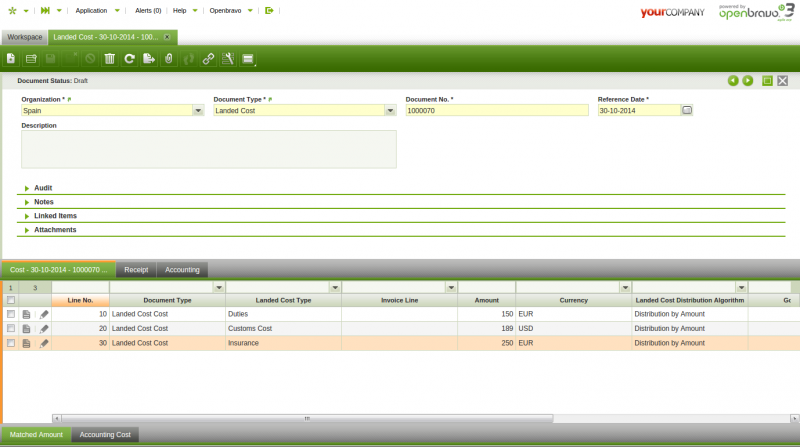
A Landed Cost Document can have as many cost (lines) as landed cost types to allocate to the Goods Receipt(s) selected.
¶ Process Matching
Matching between an "estimated" landed cost and an "invoiced" landed cost can be processed in:
1. the GOODS RECEIPT window before processing and by using the process button "Complete" This scenario takes place whenever all landed cost related information below is available and entered in the Landed Cost tab of the Goods Receipt :
- landed cost types
- landed cost amounts
- related landed cost invoice lines.
This scenario automatically creates:
-
- a landed cost document in the landed cost window related to the goods receipt that contains all the information entered in the "Landed Cost" tab of the Goods Receipt.
This landed cost document is already processed and matched, therefore only actions missing are to post the landed cost document (header) and to post the landed cost matching.
-
- a landed cost adjustment that adjust the cost of each product included in the Goods Receipt.
¶ Matched Amount
Matched Amount tab is a red only tab that allows to review the purchase invoice lines matched against landed cost lines.
¶ Accounting Cost
This tab provides Landed Cost document accounting information.
¶ Receipt
Receipt tab allows to select either the receipt(s) or receipt line(s) to which landed cost types booked are going to be allocated.
¶ Receipt Line Amount
Receipt Line Amount is a read only tab that shows detailed information about the landed cost type line allocated to each receipt line, as well as the landed cost amount distributed to each receipt line.
¶ Accounting
This tab provides Landed Cost Matching accounting information.
Full list of Landed Cost window fields and their descriptions is available in the [Landed Cost Screen Reference](/Screenshot/Landed_Cost).